
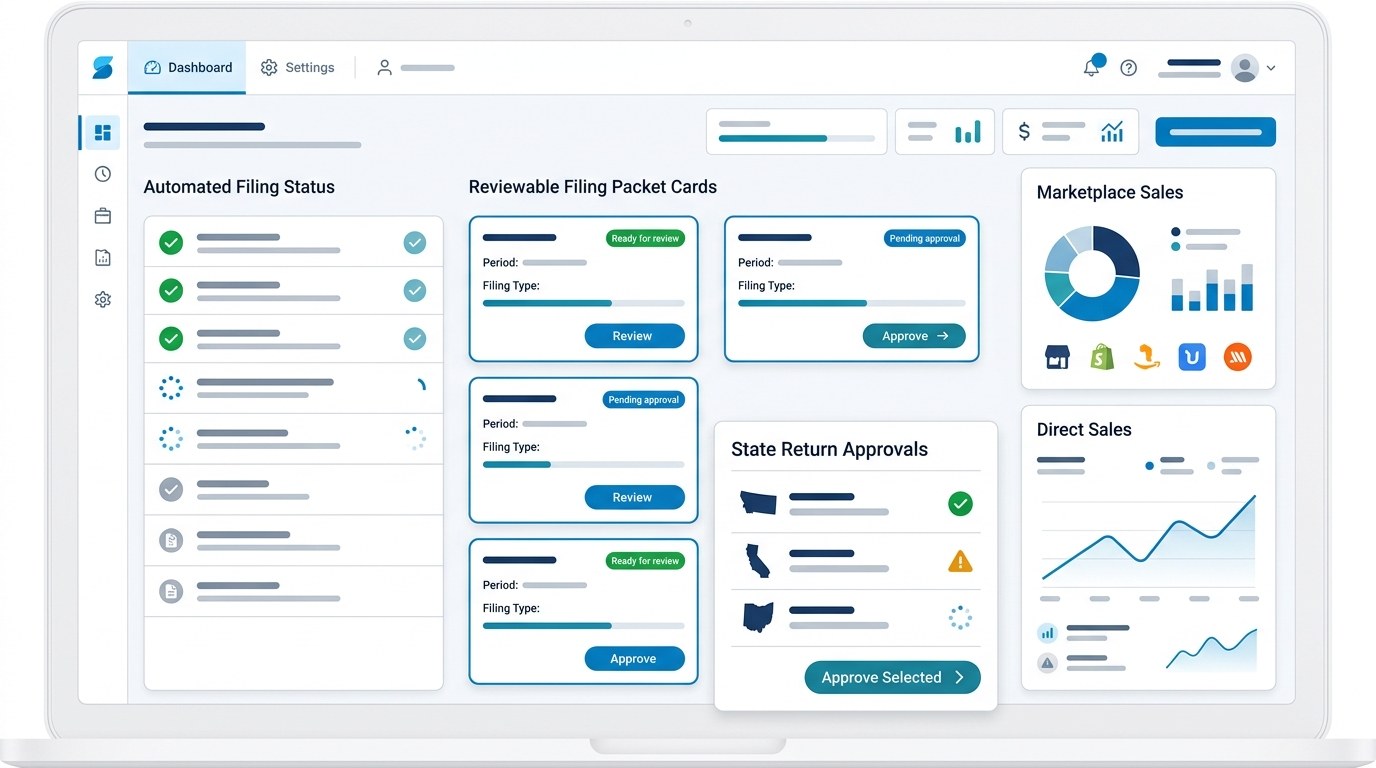
Source data, adjustments, approvals, and confirmation in one filing packet.
Standard sales tax filings are $45 per filing.
Built for merchants who want to see what supports each filing.
Quick answer.
TaxJar is a sales tax platform with reports and AutoFile. TaxJar support describes AutoFile as an electronic filing service that uses connected shopping cart data to prepare and submit returns and payments to states after enrollment. TaxJar also says sellers can use reports without AutoFile and remain responsible for filing their own returns if they do not enroll.
AtomicTax is positioned differently. It focuses on the filing operating workflow: getting merchant data into a reviewable packet, separating marketplace and direct sales, supporting registrations, tracking states, and completing standard filings for $45 per filing. If you want automatic filing inside a larger software subscription, TaxJar may be the better category. If you want filing support with clearer human review and per-filing pricing, AtomicTax is worth evaluating.
Where AtomicTax and TaxJar differ.
The practical difference is how the return gets trusted. A software-first AutoFile model relies on connected account data, report logic, enrollment, and automated submission timing. A packet-first workflow focuses on the evidence behind the return before it is filed.
- TaxJar reports: TaxJar can compile transaction data from connected carts and marketplaces into sales tax reports.
- TaxJar AutoFile: AutoFile can prepare and submit enrolled returns to states.
- AtomicTax packets: AtomicTax emphasizes source exports, reconciliation, marketplace separation, review notes, and filing proof.
- AtomicTax pricing: standard filings are priced at $45 per filing, which is easy to model across monthly and quarterly states.
- Merchant control: AtomicTax is useful when the business wants visibility into each filing rather than only status automation.
What the AtomicTax filing workflow looks like.
AtomicTax works from the messy middle of sales tax: platform exports, marketplace reports, refunds, exemptions, registrations, state logins, filing frequencies, and notices. Instead of treating filing as a black box, the workflow creates a packet that explains the return.
- Gather reports: collect ecommerce, marketplace, payment, refund, and exemption data for the filing period.
- Normalize states: identify which states belong in the return queue and which are watch-list or inactive.
- Separate channels: keep marketplace-facilitated sales apart from direct merchant-collected sales.
- Prepare return support: summarize gross sales, taxable sales, exempt sales, tax collected, adjustments, and expected payment.
- Review issues: flag missing reports, rate anomalies, negative refunds, and mismatch between sales tax collected and tax due.
- File and archive: submit the return, save confirmation, and keep payment proof with the packet.
AutoFile versus filing-packet review.
Automation is useful when data is clean, accounts are configured correctly, and the business is comfortable with the timing. But many merchants still need a review step because marketplace collection, returns, exemptions, and manual uploads can change what should be filed.
A filing-packet workflow is especially helpful when a business has mixed sales channels, recently registered states, prior notices, or a finance team that wants an audit trail. The packet makes the return understandable: what went in, what was excluded, what changed, who reviewed it, and where proof was saved.
Who AtomicTax is a better fit for.
AtomicTax is a good fit for merchants who need clarity around recurring sales tax operations and do not want to depend entirely on a black-box filing process. It is also useful when the seller wants help with the workflow around filing, not just the button that submits a return.
- Merchants with direct and marketplace sales in the same states.
- Businesses that prepare returns from CSV, Excel, PDFs, or mixed source reports.
- Teams that need state registration support before filing begins.
- Sellers that want predictable per-filing costs.
- Operators who want a saved packet for notices, amendments, and year-end review.
Checklist before choosing a TaxJar alternative.
Start by mapping the actual work. The right answer depends on which pain point is most expensive: calculation, reporting, enrollment, filing, review, notices, or registration.
- Do you need checkout tax calculation or only filing support?
- Do marketplace sales need to be excluded from direct filings?
- Do you need to upload missing data manually?
- Do returns require human review before submission?
- Are state logins, filing frequencies, and payment methods documented?
- Do you need a saved evidence packet for each filing?
- Would $45 per standard filing be easier to budget than a larger software subscription?
FAQ.
Is AtomicTax a full TaxJar replacement?
No. TaxJar is a software platform with reports and AutoFile. AtomicTax is a focused filing workflow for merchants who want reviewable packets, state workflows, and standard filings at $45 per filing.
Can AtomicTax file from CSV or Excel data?
Yes. AtomicTax can use CSV files, Excel workbooks, connected data sources, PDFs, and marketplace exports when the data supports a reliable filing packet.
When is AtomicTax a better fit than TaxJar?
AtomicTax can be a better fit when the merchant wants human-readable filing support, state registration help, marketplace separation, and predictable per-filing pricing.
Does AtomicTax support marketplace sales review?
Yes. AtomicTax filing packets separate marketplace-facilitated sales from direct merchant-collected sales before filing.
Sources and references.
Want filing support with a clearer packet?
AtomicTax helps merchants prepare reviewable sales tax filing packets, separate marketplace and direct sales, and complete standard filings for $45 per filing.